




Your team already has a vocabulary. You may call it a “deal,” not a “contract” or “pending legal,” not “awaiting review.” But if your CLM platform uses a different vernacular, your team may stall on fields they don't recognize, ask what a status means, or lose trust in the data they're entering.
Custom labels — which was recently released in our 2026.2.1 update — gives admins the ability to rename key elements of the UI to make IntelAgree more familiar, intuitive, and easier to adopt across every team. Here's what you can expect:
Adapt the Platform to Your Organization’s Voice
The most immediate source of terminology friction lives at the top level with the menus, buttons, and labels users encounter every time they open the platform.
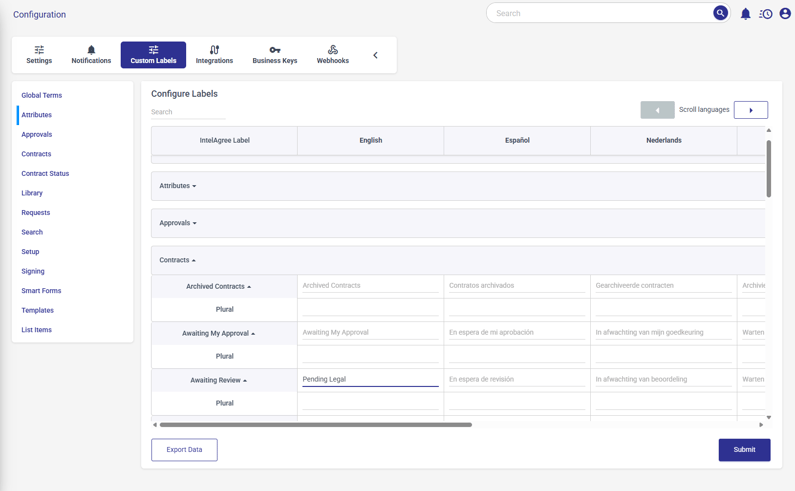
We built navigation-level custom labels for exactly this reason. With custom labels, admins can rename UI terms like “Contracts” to “Agreements”, “Organization” to “Company”, and “Attachments” to “Supporting Docs.”
Beyond navigation, admins can also rename:
- Workflow terms: “Awaiting Review” to “Pending Legal”
- Global terms: “Owner” to “Manager”
- Attributes: “Attribute” to “Tracked Value”
- User roles: “User” to “Employee”
- Operational data: Dropdowns, statuses, and values used in approvals, reports, and exports
Once updated, the new terminology appears in the user interface, search filters, reports, and system-generated notifications.
Why It Matters for Your Business
When the words on the screen don't match the words your team uses, they're holding two vocabularies at once — their own, and the platform's — and mapping between them every time they work.
That mapping is why a user pauses before filing a status, double-checks a field before entering data, or messages a teammate to confirm they're looking at the same thing.
Custom labels let IntelAgree meet your team where they are. New users see familiar terms from day one. Legal, sales, procurement, HR, and finance work from the same vocabulary. And when field names and status labels are consistent, the data flowing into reports and exports reflects how your business actually operates across teams, regions, and workflows.
What's Ahead: Multilingual UI Support & More
In future releases, you can expect to see:
- Multilingual Support: IntelAgree is expanding into full multilingual support across the application (we’ve already expanded to French Canadian). Soon, users will be able to select a preferred language and see the entire UI in that language, ideal for teams operating across multiple countries or legal jurisdictions.
- Search with Saige Assist: Agent: Smarter contract search, powered by Saige Assist: Agent. Get instant clarity into your contracts through natural language queries and summaries
- Word Add-In for Saige Assist: Agent: Bring Saige Assist: Agent into your Microsoft Word workflow — access contract intelligence without leaving your document.
Get Ready to Customize Your IntelAgree Experience
Many CLM platforms decide the vocabulary for you. Custom labels hand that decision back to the admin — what every screen, status, and field gets called is yours to set.
If you'd like to try custom labels or want more information, please reach out to your IntelAgree CSM.
Additional Reading
 What's New: Use IntelAgree in Your Preferred Language — Discover how IntelAgree's new multi-language capabilities enhance collaboration for global teams, enabling seamless contract management across…
 What's New: Connect, Share, and Learn with IntelAgree Community — Join the IntelAgree Community to connect with peers, share best practices, and enhance your contract management experience with real-world…
.png) What's New: Keep Contracts Moving When Key Approvers Are Out — Streamline contract management with IntelAgree's new out of office coverage feature, enabling seamless approvals even when key team members are…
What's New: Keep Contracts Moving When Key Approvers Are Out — Streamline contract management with IntelAgree's new out of office coverage feature, enabling seamless approvals even when key team members are…