




.png)
One approval shouldn't be able to stop a contract. But when the approver is out — vacation, conference, sick day — work piles up, deadlines slip, and the workarounds people cobble together leave no record of what actually happened.
As part of our out of office feature, we're releasing out of office coverage — a feature coming to IntelAgree in our 26.2.2 release on May 18, 2026 — which solves this with structured, auditable delegation. Designated team members can step in and act on behalf of absent colleagues, handling approvals, reviews, and signatures, without losing the visibility or control your team depends on.
Here’s how the feature ensures actions stay tracked, attributed, and aligned with existing permissions:
What Is Out of Office Coverage in Contract Management?
Out of office coverage lets you assign colleagues or teams as coverage users who can act on your behalf without compromising security or visibility. This ensures no contract gets held up when you're away from your desk.
With out of office coverage, you can:
- Define who can act as a coverage user
- Set start and end dates for out-of-office periods
- Allow coverage users to manage approvals, signatures, and reviews
- View clear audit trails of all delegated activity
How Out of Office Coverage Works in IntelAgree
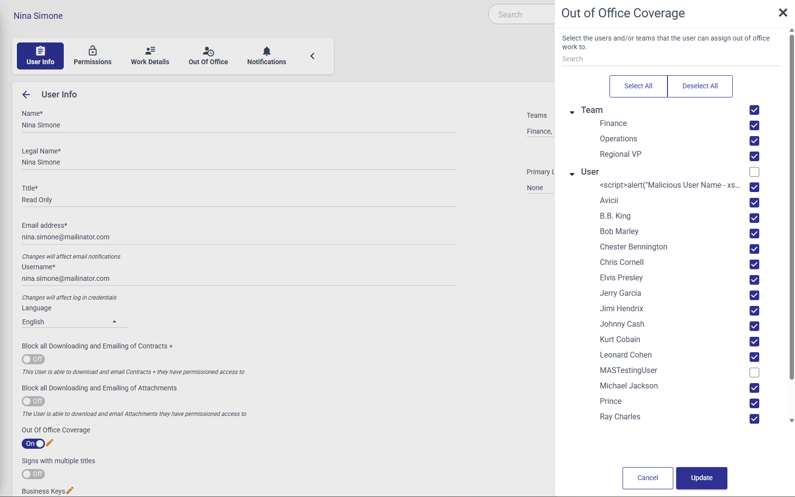
Before anyone goes out of office, admins define exactly who is eligible to cover for each user. The right people are already approved and ready before an absence ever happens. This ensures only pre-approved colleagues can step in. Admins can grant delegation access by:
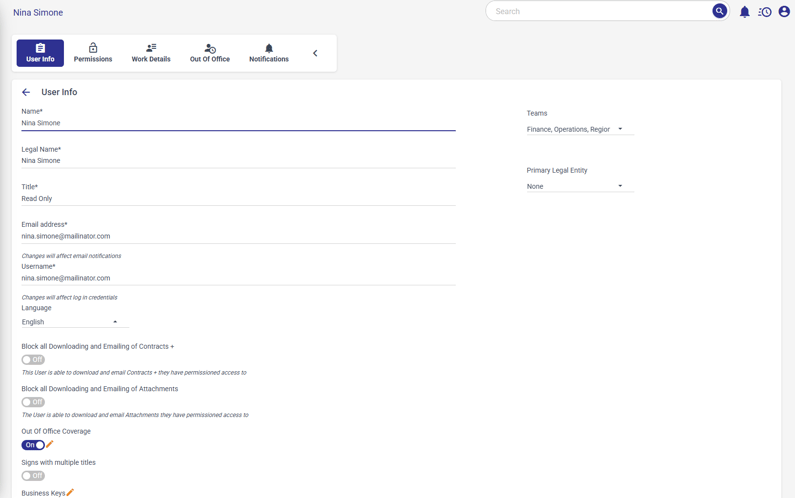
- Opening the user permissions section
- Enabling the out of office toggle
- Assigning one or more coverage users or coverage teams
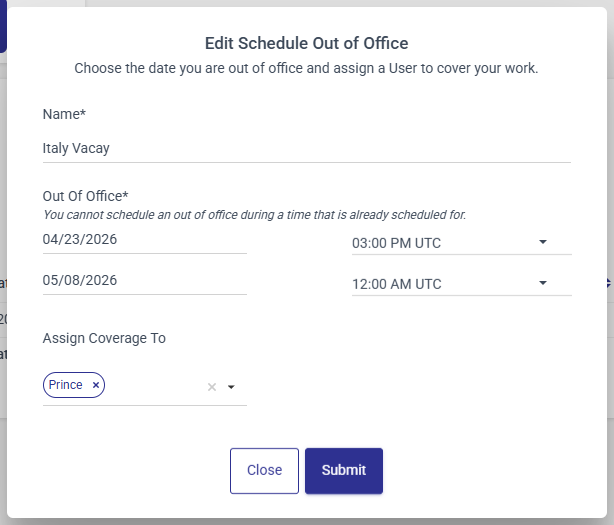
When it's time to head out, you set up your own coverage window directly from your profile, selecting your dates and coverage users without any additional admin steps. To set up your coverage period:
- Navigate to my profile > out of office
- Schedule the date range for your out of office period
- Select one or more coverage users or teams from the admin-approved list
IntelAgree uses the subscription's default time zone to ensure clarity across locations.
Impersonation Access with Full Auditability
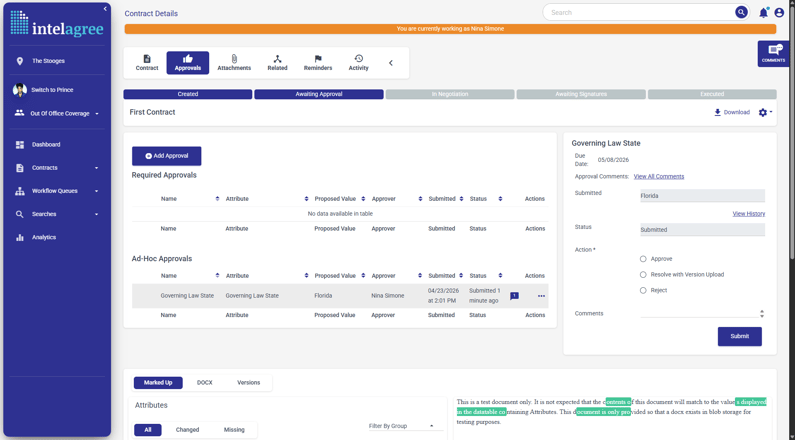
During the coverage window, coverage users enter impersonation mode directly from their profile menu. This gives them full access to the tasks and workflows assigned to the out-of-office user.
In impersonation mode, coverage users can:
- View and manage tasks assigned to the absent user
- Take actions including approvals, redlines, and signatures
- Retain a clear system record of who performed what and on whose behalf, with labels like: "Approved by Chris Cornell on behalf of Nina Simone."
Access remains controlled at every level. Coverage users can act within the bounds of the original user's permissions, while sensitive admin areas like manage users and configuration stay restricted to preserve security controls.
Why Coverage Has to Be Systematic
Your CLM software is a system of record. Every approval, every signature, every redline is logged because your organization needs to prove who did what and when. That record is what makes your contracts enforceable, auditable, and defensible.
One person's PTO shouldn't punch a hole in it. Out of office coverage makes sure it doesn't. When a coverage user steps in, their actions run through the same workflows and produce the same audit trail as the person they're covering for. Nothing moves off the books, and no one is left piecing together what happened while someone was away.
"I'm going to use this when I'm out for two weeks later this year. I've already warned my boss that she's getting the delegated tasks." — Lee Rone, General Counsel at IntelAgree
What's Coming Next
These enhancements are also expected to launch in upcoming releases:
- Out of Office Digest Email: An emailed summary of all the work the coverage user(s) did while the out of office user was absent.
- Flexible impersonation UX: More flexibility in how coverage users move through and act within impersonation mode.
- Continued permission guardrails: Continued refinements to permissions and audit logging.
If you want to pilot or provide feedback while this feature is in development, please reach out to your IntelAgree customer success manager.
Additional Reading
 What's New: Use IntelAgree in Your Preferred Language — Discover how IntelAgree's new multi-language capabilities enhance collaboration for global teams, enabling seamless contract management across…
 What's New: Custom Labels for a More Familiar IntelAgree — Customize your IntelAgree experience with new custom labels to match your team’s terminology for seamless adoption and clarity.
 What's New: Connect, Share, and Learn with IntelAgree Community — Join the IntelAgree Community to connect with peers, share best practices, and enhance your contract management experience with real-world…